
Customer page block
Add the app block to customer pages in the Shopify admin to see a customer's open and completed draft orders at a glance.
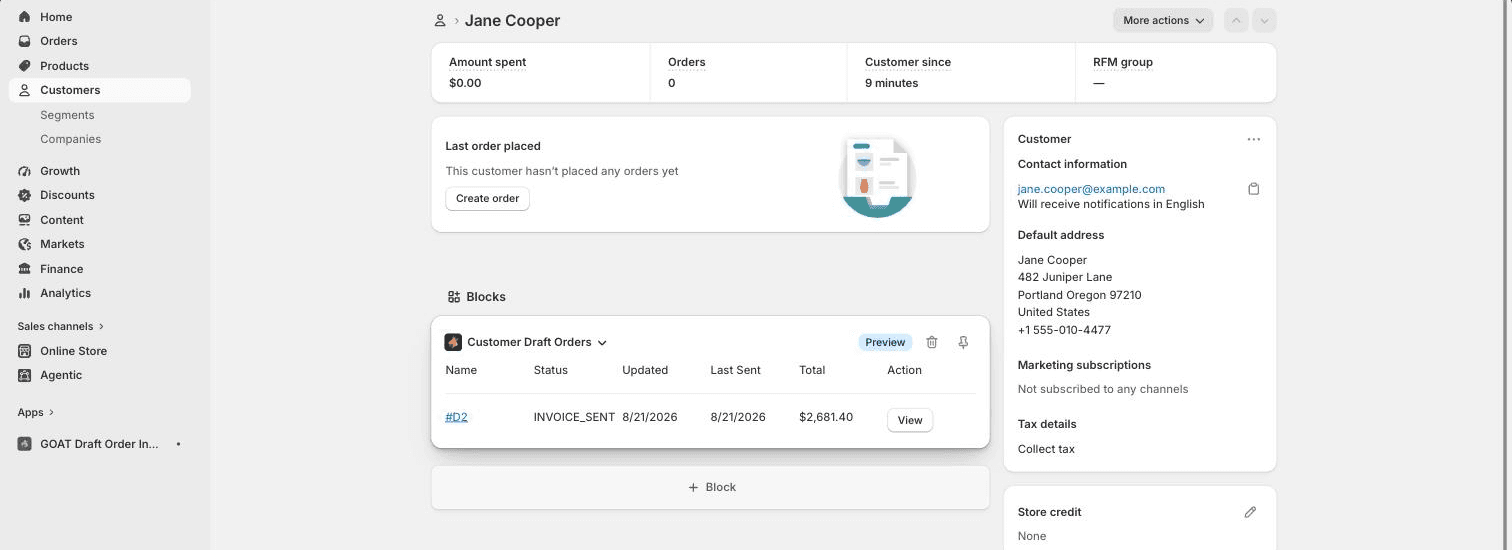
The app ships an admin block called Customer Draft Orders that you can pin to the customer details page in your Shopify admin. When you're looking at a customer, their draft orders are right there - no need to switch to the app or filter the drafts list by hand.
Adding the block
- In your Shopify admin, go to Customers and open any customer.
- In the Blocks section (or via the page's customization menu), click + Block.
- Choose Customer Draft Orders from B2B Draft Order Invoices.
- Pin the block to keep it on the customer page permanently.
What it shows
For the customer you're viewing, the block lists each draft order with:
- the draft order name, linked straight to the draft order in your admin
- its current status (open, invoice sent, completed)
- when it was last updated and when the invoice was last sent
- the total, and a View action
Long lists are paginated inside the block, so heavy B2B buyers with many drafts stay tidy.
Good to know
- The block reads live draft order data from Shopify, so it always matches what you'd see under Orders → Drafts.
- It pairs well with the payment reminders email log: check the customer page for what's outstanding, then open the draft in the app for its full email history.
Classic customer accounts
Show open draft order invoices on the classic, theme-rendered Shopify account page using the app's theme widget.
Draft order page block
Control whether a draft order invoice is visible to your customer - and send the invoice email - right from the draft order page in the Shopify admin.