
Classic customer accounts
Show open draft order invoices on the classic, theme-rendered Shopify account page using the app's theme widget.
Stores that still run classic customer accounts - the password-login account page rendered by your theme at /account - get the same open-invoices experience through the app's theme widget. If your store uses the newer Shopify-hosted customer accounts (the default for new stores), use the customer accounts guide instead.
What customers see
Logged-in customers see an Open Invoices table on their account page listing each open draft order invoice with its date and amount. Every row has a Pay Now button that opens Shopify's secure invoice checkout, and a PDF button that downloads the invoice as a PDF document.
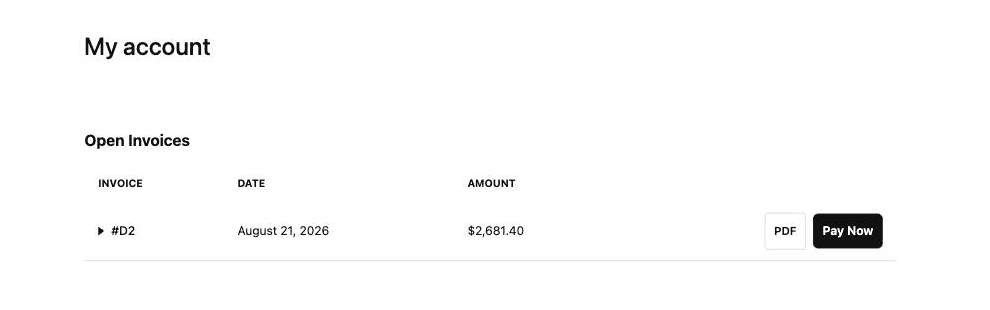
Customers can expand a row to review the invoice's line items, quantities, and totals before paying:
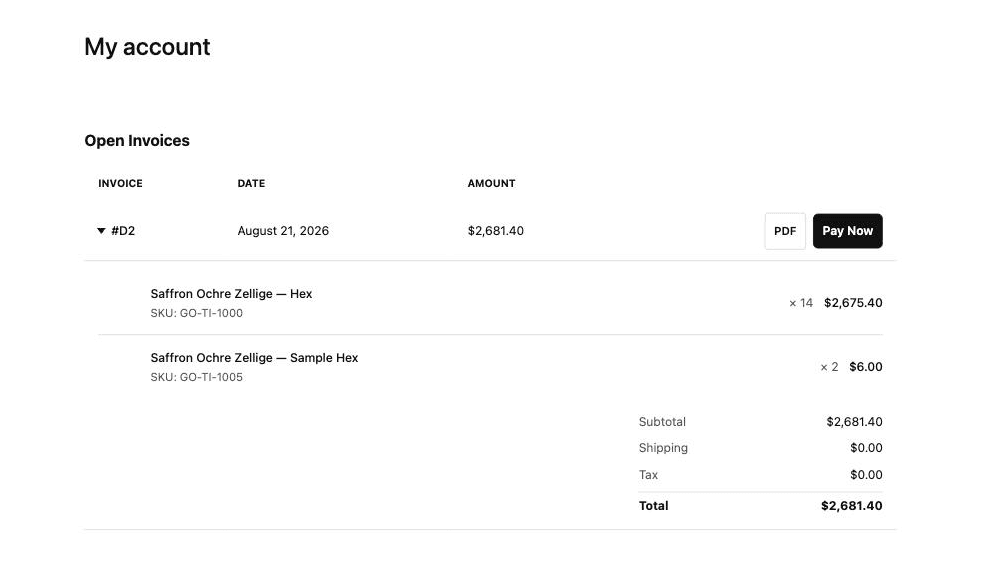
Invoices are matched to the logged-in customer by email, and each customer only ever sees (and can only download) their own invoices. A draft appears once its invoice has been sent or you've marked it visible - controllable per draft, including hiding an already-sent invoice while you revise it, from the Invoice visibility block on the draft order page.
Setting it up
The widget ships as a theme app extension - an app embed plus an Account Page Draft Table block you place in the theme editor. Follow the theme widget setup guide to enable it.
Customizing
From the block's settings in the theme editor you can change the heading, column labels, pay button text, empty-state message, and colors - plus toggles for the expandable line-item details and the PDF download button. The app's Customize Widget page gives you a live preview while you adjust the widget's style and composition.